Latest release
Solvex Audio 1.0.0-beta3: a lighter app with CNC cutting sheets
The biggest update to our speaker box design software so far. The whole app has been rebuilt to be faster and much smaller, the cutting list now exports straight to CAD and CNC, and the editions have been reshuffled so bandpass boxes are cheaper to design.
Highlights
- A new, much lighter app. Solvex Audio has been rebuilt on a new desktop engine (Tauri and Rust). The Windows download drops from about 175–265 MB to about 4 MB, and macOS to about 10 MB. Linux comes as an AppImage of about 100 MB. It looks and works the same as before, and your projects, drivers, settings and licence carry over.
- Cutting sheets for CNC and CAD. Export the whole cutting list as DXF (AutoCAD R12) or SVG. Panels are laid out on standard 2440 × 1220 mm sheets with saw-kerf spacing, and each one is labelled with its name, size and bevel angle.
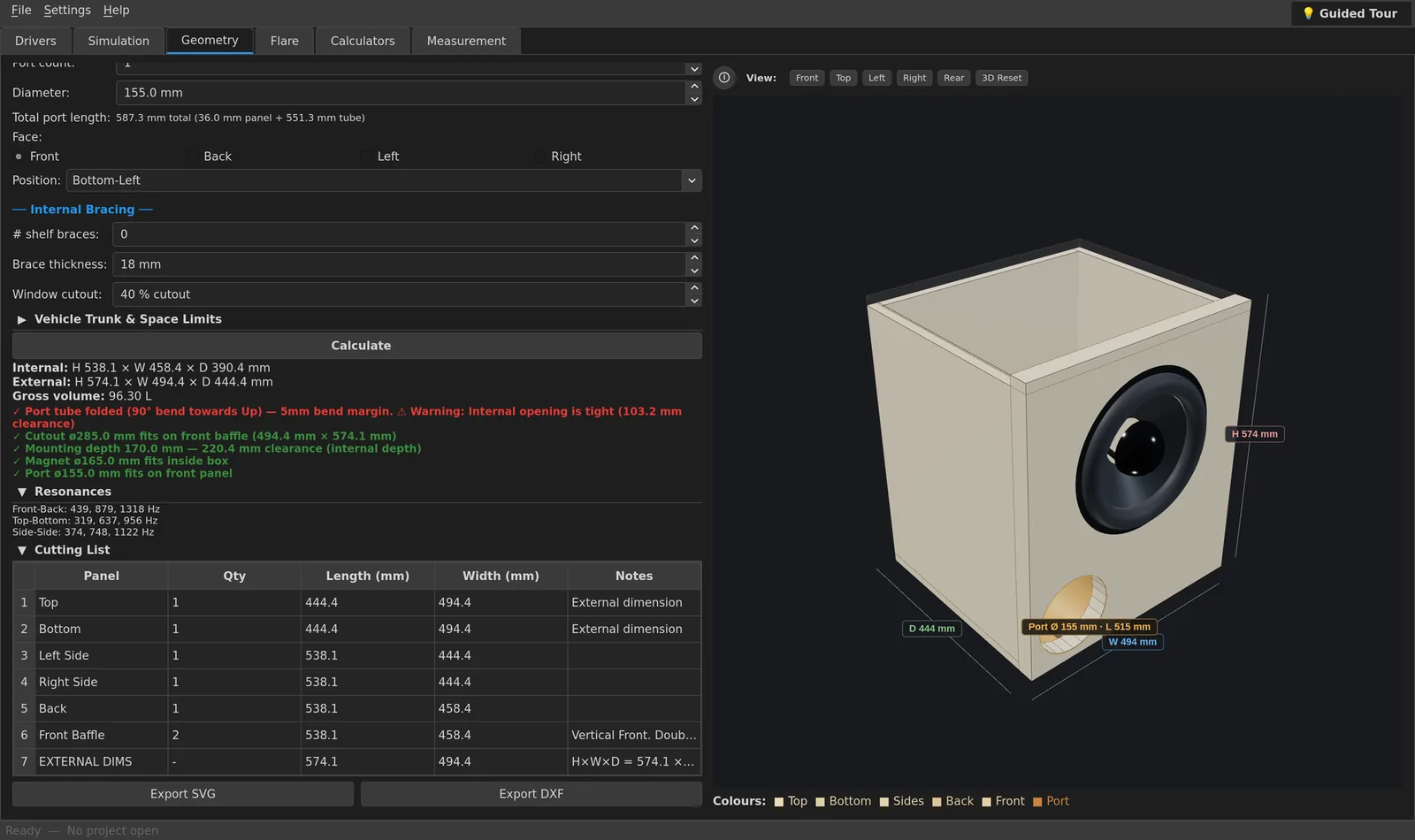
- New 3D enclosure view with realistic materials, driver cutouts, ports, dimensions and preset camera angles.
- Measurement tab (Enterprise). Measure a speaker with a microphone using a log sine sweep: impulse response, gated quasi-anechoic frequency response, delay and input level.
Editions
Feature access now matches the pricing table:
- 4th-order bandpass (BP4) moves down to Home (it was Pro). Tapped and folded horns move up to Pro (they were Home).
- Home: DXF/SVG cutting-sheet export, 90° bent ports, room and cabin gain, and trunk fit limits in the Geometry tab.
- Pro: REW measurement overlay import and the Vehicle & Cargo Space calculator.
Simulation
- Passive radiators: the response now shows the real notch at the radiator's resonance, so passive-radiator curves are more accurate.
- New wiring option: isobaric series.
- Bandpass (BP4): choose the chamber layout (rear sealed and front vented, or the reverse) and set the front and rear volumes separately.
- Port air velocity graph: a dashed chuffing limit at the tuning frequency and a dotted compression limit, and the graph scales so both lines are always visible.
- Auto-Optimize Port works without popups. Long-port warnings appear in the status bar.
- More accurate box volume: the full port volume is now subtracted from the box, and slot ports that share a wall with the cabinet aren't counted twice.
Geometry and cutting list
- 90° bent ports: choose the bend direction (Auto, Left, Right, Up, Down). Auto picks the side with the most room, and the port always stays inside the box.
- Slot ports sit flush against the cabinet walls, with no wasted gap.
- Cutting list: shows every panel at full length. Drag a column edge to resize it and double-click to reset; widths are remembered.
- Driver placement: set the driver count, mounting face and offsets for each sub, or move them together. Cutouts automatically avoid ports, each other and the panel edges, and the export matches the screen exactly.
- Bandpass chambers: divider position, vented chamber and magnet direction.
- Vehicle trunk limits: enter your trunk size and see at once whether the box fits.
- Flare tab: port shape, size and count stay in sync with the Simulation and Geometry tabs as you type.
Calculators
- Vehicle & cargo space: trunk capacity, the space left over, and one-click import of the box size from the Geometry tab.
- dB calculator: acoustic environment (free space, ground plane, corner, and car interiors with cabin gain), thermal compression, and power per driver or for the whole system.
- Corrected the labels for coherent and incoherent summing.
Languages
- All 7 languages are now complete: Norwegian, Swedish, Danish, German, French, Spanish and English. About 380 strings per language that used to appear in English are now translated, including the help pages and the guided tour.
- German no longer confuses box volume with loudness, and headings no longer show "_" instead of "&".
Projects, settings and updates
.sapproject files now also save panel thickness, driver offsets and mounting face, bend direction, BP4 layout and volumes, passive-radiator settings, unit system and trunk limits. Older project files still open.- All settings are now stored in one place. Your theme, units and update preferences may reset to their defaults once after updating; just set them again.
- Fixed: beta users were never told about new beta versions. Beta updates are now detected correctly.
- Fixed update download links that pointed to a missing release.
- Licence protection has been strengthened. Existing licences and trials move over automatically.
Other fixes
- Linux (Wayland): the window's minimize, maximize and close buttons work again.
- Fixed a crash in the Geometry tab.
- Imperial mode: panel thickness is converted correctly, and inch inputs have sensible ranges (0.75″ was being pushed up to 6″).
- The Linux desktop-shortcut installer works when run from any folder.
Known limitations
- Measurement currently works with the built-in simulated device only. Support for real sound cards is coming next.
- The app isn't code-signed yet. On macOS, right-click the app and choose Open the first time. On Windows, click More info → Run anyway.
Download 1.0.0-beta3
The Basic edition is free forever. Home and Pro can be tested free during the beta.